Phone Systems For Small Business UK
Choosing Phone Systems for Small Business UK needs a clear look at how your team works, how customers contact you, and how fast your business may grow. Start with the basics. Check your call volume, remote working needs, budget, customer service goals, and any old landline services that must be replaced. If you want help comparing your options, Cleartwo can guide you through it without making it feel like a telecoms exam.
Why Your Phone System Choice Matters
Your phone system affects more than calls. It shapes how customers reach you, how fast your team replies, and how professional your business feels. Let's be honest, nobody wants a first impression to be a missed call and a voicemail greeting from 2014.
For small businesses, the right setup can support remote working, call routing, call recording, CRM integration, Microsoft Teams phone use, and better customer service. The wrong setup can create delays, hidden costs, and awkward moments where three people answer the same call while the customer gives up.
Understand Phone Systems For Small Business UK
The main options for UK small businesses are traditional landlines, onsite PBX systems, hosted VoIP, cloud PBX, SIP trunking, and Microsoft Teams phone services. Each one suits a different type of business. The best choice depends on your current setup, budget, support needs, and growth plans.
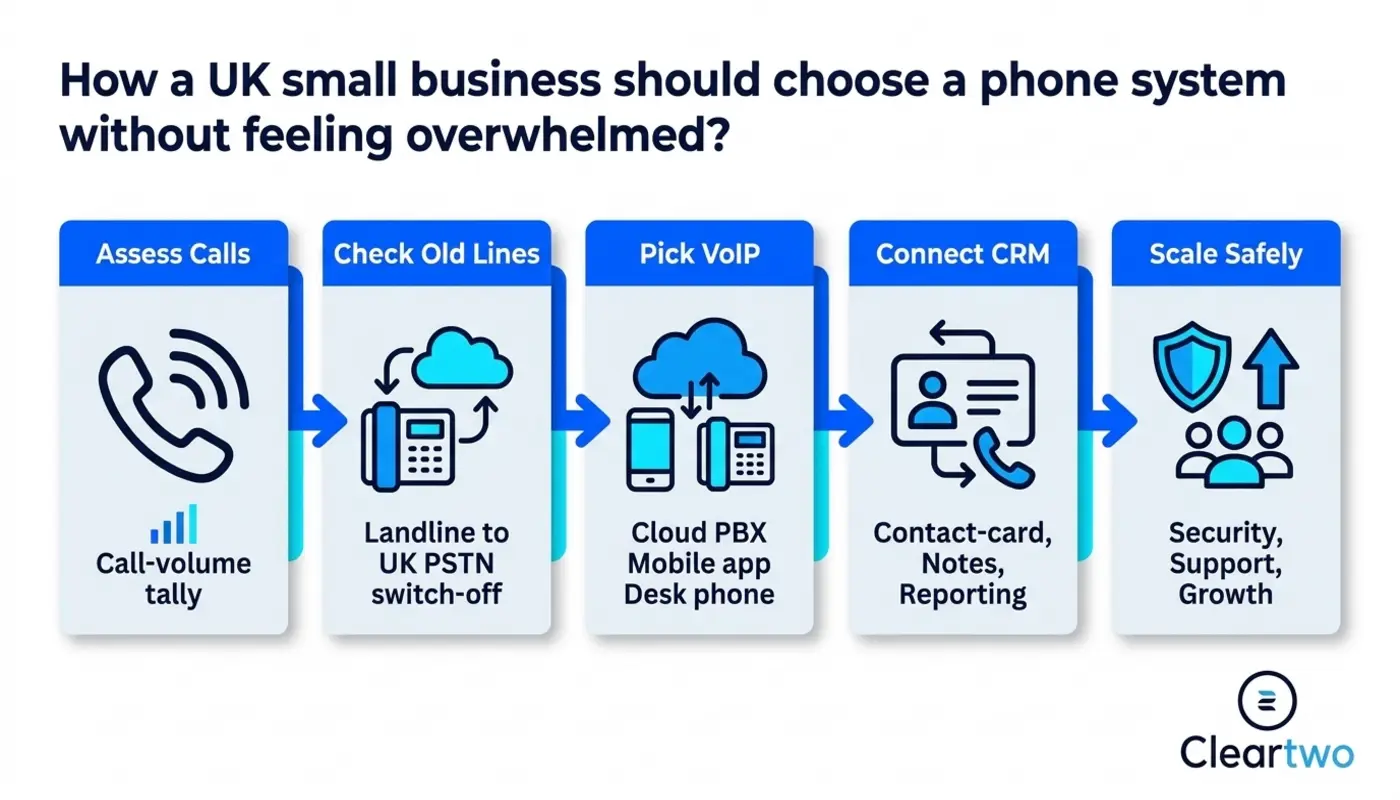
A traditional landline is familiar, but it is no longer future proof. The UK PSTN and ISDN networks are being retired. Businesses need to move to digital services by 31 January 2027. This affects old phone lines, fax machines, alarms, card terminals, lift phones, and door entry systems. If you are not sure what is connected to what, no judgment. Most businesses find at least one forgotten box with a blinking light and no clear purpose.
Traditional Landlines And Old PBX Systems
Traditional systems use physical phone lines. Many offices also have a PBX box hidden in a cupboard. No judgment if nobody has opened that cupboard since 2011. These systems can still work, but they are harder to scale. They can also cost more to maintain and do not fit well with the UK move to digital phone lines.
Hosted VoIP And Cloud PBX
Hosted VoIP uses the internet to make and receive calls. A cloud PBX is the phone system itself, hosted online instead of sitting in your office. In simple terms, your calls, users, voicemail, menus, call queues, and routing are managed through an online system.
This is often the most practical route for small businesses. You can use desk phones, mobile apps, laptops, or softphones. A softphone is calling software that works on a computer or mobile. Hosted VoIP also works well for hybrid teams, sales teams, customer service staff, and businesses that want modern features without buying a large onsite system.
SIP Trunking For Existing Systems
SIP trunking connects a compatible PBX to digital phone services over the internet. It can be useful if your current system still works and you do not want to replace everything at once. Think of it as giving an older system a digital route to the phone network.
It is not always the easiest option for small teams. You still need to manage the PBX, network quality, security, and support. For some businesses, especially those with existing hardware and specific call flows, it can be a sensible bridge.
VoIP Versus Traditional Landline
VoIP is usually the stronger long term choice for UK small businesses. It supports digital calling, flexible working, faster changes, and better features. Traditional landlines feel familiar, but they rely on the old network that is being replaced.
Here's the thing. Choosing between VoIP and a landline is not only about price. It is about whether your business can answer calls from anywhere, add users quickly, connect calls to your CRM, and keep working if the office has a problem. A hosted business phone setup gives you more control. A traditional system can leave you waiting for engineers and line changes.
Cloud VoIP can offer savings of up to 60 per cent in some cases. This is not guaranteed for every business. Savings depend on your current line rental, call volumes, hardware, broadband, support costs, and how the system is installed. So yes, savings are possible, but let's not pretend every quote comes with a magic wand.
Features Small Businesses Should Prioritise
The best small business phone systems in the UK should cover call handling, mobility, reporting, security, and integrations. Do not buy the system with the longest feature list. Buy the one your team will actually use.
- Auto attendant menus
- Call routing rules
- Voicemail to email
- Mobile softphone access
- Call recording controls
- CRM call logging
- Business hours routing
Call recording is useful for training, quality checks, and regulated work. It still needs care. Recording is not automatically compliant. You need a clear purpose, caller notice, retention rules, access controls, and a policy that fits your legal duties.
CRM integration is another key feature. A good VoIP setup can support click to call, screen pop ups, call notes, call logs, and recording links. If your team uses cloud CRM, custom CRM systems, or sales dashboards, check the exact integration before signing. Not every platform connects in the same way.
Match The System To Your Team And Growth
Your phone system should fit the business you are building, not only the business you have today. A sole trader may need a professional number and mobile calling. A ten person team may need queues, departments, and call reports. A growing company may need multi site support, UCaaS, and Microsoft Teams phone integration. UCaaS means unified communications as a service. It brings calls, messages, meetings, and team tools into one managed service.
Before choosing, map out how calls move through your business. Who answers first? What happens after hours? Do sales calls need recording? Does support need queues? Do managers need reports? This simple step can save a lot of stress later.
If your wider setup includes automation, digital marketing, web development, ecommerce marketing, AI marketing tools, or AI driven solutions, your phone system should not sit on its own little island. It should connect with your CRM, website, forms, customer records, and reports. That is where modern communications become genuinely useful.

Calculate The Real Cost Before You Commit
Total cost is not just the monthly licence. You also need to include handsets, headsets, installation, number porting, broadband, training, call charges, support, call recording storage, integrations, and any exit fees. Between you and me, the cheapest monthly price is not always the cheapest real option.
A practical way to compare systems is to calculate the cost over three to five years. Add setup, hardware, licences, support, connectivity, maintenance, and likely changes as the business grows. You can also explore VoIP phone system cost guidance if you want a clearer view of what affects pricing.
Do not forget downtime. If a cheap system drops calls, confuses customers, or takes days to fix, the true cost is higher than the invoice. Lost leads and frustrated customers rarely appear as line items, but they are very real. If you are worried about hidden fees or being pushed into the wrong contract, you are not being difficult. You are being sensible.
Ask The Right Reliability Questions
Reliability matters because phones are still one of the fastest ways customers reach a business. Before choosing a provider, ask about uptime, support response times, fault reporting, broadband backup, power cuts, emergency calling, and disaster recovery. No stress, you do not need to become a network engineer. You just need clear answers.
Ask whether support is UK based. Check whether installation is managed. Confirm who handles number porting. Ask what happens if your broadband fails. Can calls divert to mobiles? Is there mobile failover? Are call queues backed up? Is emergency calling set up correctly?
This is also where your wider IT support and security setup matters. VoIP depends on your internet connection, devices, passwords, network settings, and user access. A secure setup should include strong passwords, permission controls, secure setup of devices, and sensible admin access.
Why Cleartwo Recommends CallSwitch One
Cleartwo supplies and supports CallSwitch One as a hosted phone platform for small businesses. It gives strong VoIP, cloud PBX, call recording, CRM integration, mobile apps, and enterprise level features without heavy complexity. As CallSwitch One resellers, Cleartwo gives customers a managed experience with hands on setup, competitive pricing, and practical support from people who know the platform well.
You can learn more about CallSwitch One if you want to see the platform itself. The real benefit is not just the software. It is having Cleartwo help choose the right setup, configure it properly, train your team, and support it afterwards. That beats being left alone with a login screen and a hopeful thumbs up.
How Cleartwo Helps With Setup And Support
Cleartwo helps UK small businesses choose, install, and support the right phone system as part of a managed service. Cleartwo handles discovery, planning, number porting, configuration, testing, training, and ongoing support from the start.
As a managed UK VoIP specialist, Cleartwo can review your existing lines, users, devices, call flows, Microsoft Teams needs, CRM integration, recording requirements, and PSTN switch off risk. If you are unsure where to begin, Cleartwo VoIP phone systems are designed to give SMEs enterprise features at SME pricing, with UK based support and managed setup.
For businesses comparing options, the related guide on how to choose a business VoIP system is a useful next step. It goes deeper into the questions to ask before you buy.
Future Proof Your Phone System
A future proof phone system should let you add users, locations, numbers, departments, queues, and integrations without rebuilding everything. It should support remote workers, mobile users, Microsoft 365 setups, and changes in customer demand.
Check contract terms carefully. Can you reduce users if your team changes? Are numbers portable? Are setup fees clear? Who owns the configuration? Can you change call flows without paying for every small update?
Also think about where your business is heading. If you plan to grow ecommerce, add a sales team, improve customer service, use custom CRM systems, or introduce business automation, your phone system should support that journey. Choose something manageable now, but flexible enough for what comes next.
Final Thoughts
The best phone system for a small business is the one that fits your team, customers, budget, and growth plans. Hosted VoIP and cloud PBX are often the strongest choices in the UK because they support flexible work, simple scaling, and the move away from old landlines.
If you are not sure what phone system your business needs, or you want someone to check your old lines before anything changes, speak to Cleartwo. Cleartwo can help you compare VoIP, Microsoft Teams phone options, and cloud phone systems without pressure, confusion, or mystery fees. You have got this, and Cleartwo can help make it simpler.
Frequently Asked Questions
What Is The Best Phone System For A Small Business In The UK?
The best phone system depends on your team size, call volume, working model, budget, CRM needs, and growth plans. For many UK small businesses, hosted VoIP or cloud PBX is the most practical choice. It supports remote working, flexible call routing, easy scaling, and the move away from PSTN and ISDN services.
Do I Need To Move Before The PSTN Switch Off?
Yes. If your business still relies on PSTN or ISDN lines, you should plan your move before 31 January 2027. Do not leave it until the final rush. Review phones, alarms, payment terminals, door entry systems, fax machines, broadband, and any other equipment connected to old phone lines.
Can Microsoft Teams Replace My Business Phone System?
Microsoft Teams phone can replace or support a business phone system when set up with the right licences, PSTN connectivity, call routing, emergency calling, and support. It works well for teams already using Microsoft 365. Businesses with advanced call handling, recording, or CRM needs should also compare it with a dedicated hosted VoIP platform.
Is Call Recording Legal For UK Small Businesses?
Call recording can be legal, but it must be handled properly. You need a clear purpose, suitable notices, access controls, retention rules, and a lawful basis under data protection rules. The phone system provides the feature, but your business policy and setup decide whether recording is used responsibly.
How Long Does It Take To Set Up A Small Business VoIP System?
A simple VoIP setup can often be completed in days. Larger moves with number porting, multiple sites, Teams integration, CRM links, and training may take several weeks. The safest approach is to plan early, test call flows, confirm number porting dates, and avoid rushing the changeover.