What VoIP Hardware UK Offices Actually Need
Short answer. Less than you think. But also more than you planned for. That is how most VoIP hardware UK business setups go wrong.
Let’s be real. Half the businesses moving to cloud phone systems either overspend on shiny kit nobody uses or cling to ancient desk phones like family treasures. You do not need a museum piece on every desk.
Here’s what is actually happening. The UK is heading towards the PSTN switch off in 2027. Old lines are going. If your hardware cannot handle hosted VoIP, it is not just old. It is useless. And yes, useless means dropped calls, lost revenue, and annoyed customers.
IP Phones Vs Headsets Vs Adapters
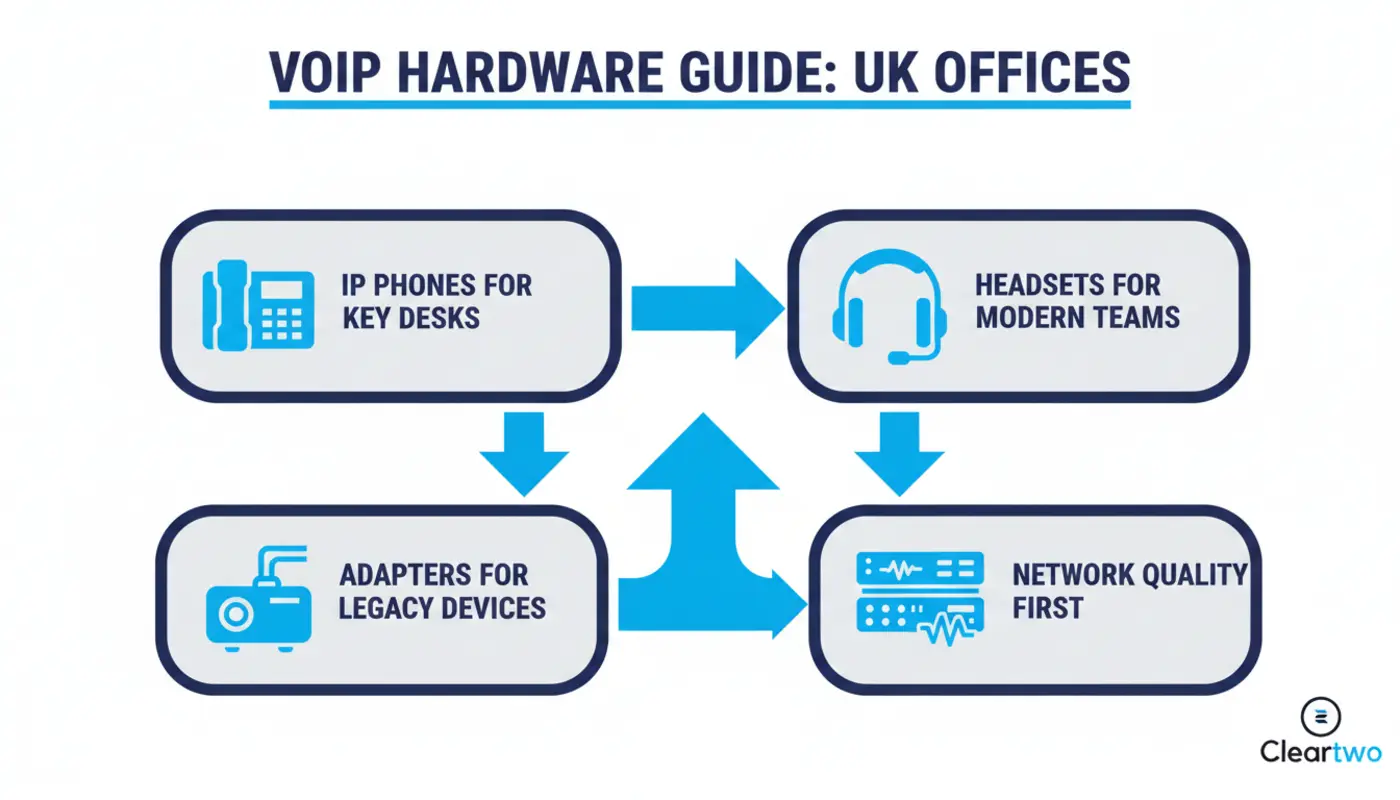
Cut the nonsense. You have three main options. That is it.
If you want a proper breakdown before picking hardware, read this simple VoIP guide or check how VoIP works in real business setups. Stop buying devices before you understand the system.
- IP desk phones
- USB headsets
- Analogue adapters
- Softphone apps
- PoE switches
- Business routers
- Network cabling
Each has a place. Each has a cost. And no, you probably do not need all of them. So why price up everything at once?

Best IP Phones For UK Businesses
IP phones are what most people picture when they think about business telephony in the UK. A desk phone that just works.
And yes, they still matter. Reception desks, shared offices, and customer facing roles rely on them. But do you need a £300 executive model for someone who answers five calls a day? Come on.
Desk Phones For Reception And Shared Desks
If your receptionist handles transfers, queues, and constant calls, a basic phone will not cope. Obviously.
You need multi line support, a clear screen, quick transfer buttons, and integration with your cloud PBX.
Without that, you get chaos. Missed calls. Confused staff. And the classic “who was meant to answer that” moment that costs you money.
Executive Phones For Frequent Callers
For sales teams or managers, higher end VoIP phones can make sense. Better sound. Bluetooth. CRM links.
Yes, they cost more. No, they are not always needed.
If your team works inside a cloud CRM or uses Microsoft Teams phone all day, a good headset is often smarter. Stop buying shiny hardware just because it looks impressive in a demo.
PoE Ethernet And WiFi Considerations
Here is where people get it wrong.
They buy great phones. Then plug them into poor networks.
If your internet is unstable, your call quality will suffer. Then you blame VoIP instead of your router.
Get proper networking infrastructure and solid switches. Power over Ethernet keeps cabling simple and tidy. No network, no calls. Simple.
Best Headsets For VoIP Teams
Honestly, headsets are where most modern offices should start.
Why? Because people are not tied to desks anymore. You are paying for flexibility. Use it.
Wired USB Headsets
Affordable. Reliable. No battery drama.
Ideal for call centres or support teams using UCaaS platforms with high call volumes. If someone is on calls all day, stability beats style every time.
Wireless DECT And Bluetooth Headsets
More freedom. Less cable mess.
They cost more. And yes, people forget to charge them. Constantly. Then they say the headset is broken. It is not broken. It is flat.
Still, for hybrid staff or managers who move around, they are worth it.
Teams Certified Options For Hybrid Workers
If you use Microsoft Teams phone, get certified devices. Stop guessing.
Otherwise you get mute problems, audio glitches, and staff blaming the system when it is the hardware. Sound familiar?
If you want a deeper look, this Teams phone system guide explains it clearly.
When To Use VoIP Adapters
Adapters are the “not ready to let go” option. The comfort blanket of office telephony.
They let you keep analogue phones by converting them for VoIP. Sometimes that is clever. Sometimes it is just delaying the obvious.
Using Analogue Handsets With An ATA
An ATA connects an old phone to a digital system.
But let’s be honest. You are attaching old tech to a modern network and hoping it behaves. That is not a long term plan.
Fax Lift Phones Alarms And Special Devices
This is where adapters make sense.
Fax machines. Lift emergency lines. Alarm systems.
These are harder to replace, so an adapter bridges the gap. That is practical, not sentimental.
Risks Of Relying On Old Equipment Past 2027
Here is the blunt truth.
If your setup depends on legacy hardware after the PSTN switch off, you are creating future problems.
Downtime. Compatibility issues. Weak support. Staff raising tickets because calls keep dropping.
Not worth it.
How To Choose VoIP Hardware For Your Office
This is where buying decisions go sideways.
Match Devices To User Type And Call Volume
Stop giving everyone the same device.
Your receptionist, sales team, and remote staff do different jobs. Why would they use identical hardware?
Different roles need different tools. Ignore that and you waste money. Simple.
Check Compatibility With Your Platform
Not all hardware works smoothly with every system.
If you use SIP trunking or a hosted platform, check device support properly.
Otherwise you get half working features and endless support tickets. Nobody wants that.
Plan For Power Cabling And Network Quality
Your network matters more than your handset.
Pair your VoIP setup with proper IT support for businesses and stable infrastructure.
No network, no calls. No calls, no customers. That is how it ends if you ignore the basics.
Microsoft Teams Phone Hardware Options
Teams changes things.
You can remove desk phones completely. But should you? That depends on how your team works, not what looks modern.
Desk Phones Certified For Teams
Still useful for shared spaces and reception areas. Especially where anyone needs to pick up and use the phone quickly.
USB Headsets And Speakerphones
The go to option for hybrid work.
Simple and flexible. Works well with CRM integration tools. If your team lives in software, give them hardware that supports that.
Direct Routing And Device Fit
Your hardware depends on how your calling is set up.
If you are unsure, do not guess. Read this practical business tech guide and plan it before spending anything.
Why CallSwitch One Is Worth Considering
Look. Hardware is only half the story.
The platform behind it matters more. A great handset on a weak system is still a weak setup.
That is why we use CallSwitch One. It works properly. It supports the hardware. And it scales without turning messy six months later.
You get UK based support and a system that does what it promises. No drama. No guesswork.
Where Cleartwo Fits In All This
Here is the reality.
Most businesses do not fail because of bad hardware. They fail because nobody planned the setup. They buy first and think later.
Cleartwo handles that. From choosing devices to full hosted VoIP rollout, including call recording, CRM integration, and Teams voice.
You get proper implementation, ongoing support, and systems that fit how your business works. Not bloated setups packed with features you will never use.
If you want to see how this links with wider systems like business automation or AI driven solutions, this CRM automation guide explains it clearly.
Frequently Asked Questions
What Hardware Do I Need For VoIP In A UK Office
You need IP phones or headsets, a stable internet connection, and a compatible router or switch. Most modern setups use headsets and softphones instead of desk phones. Adapters are only needed for older devices.
Can I Use My Existing Desk Phones With VoIP
Only if they support SIP or you add an analogue adapter. Older phones often miss key features and can cause issues. Upgrading to VoIP ready devices is usually more reliable and future proof.
Are IP Phones Better Than Headsets For Business
It depends on the role. IP phones suit reception and shared desks. Headsets suit sales teams and remote staff. Most modern offices prefer headsets because they are flexible and work well with software.
What Is An ATA And When Do I Need One
An ATA lets analogue devices like old phones or fax machines work with VoIP. It is useful for specific cases but not ideal as a long term fix for full office telephony.
Do I Need Special Hardware For Microsoft Teams Phone
Not always. Teams works well with USB headsets and softphones. Using certified devices improves sound quality and reliability, especially if your business depends heavily on Teams.