What Is a VoIP Mobile Phone?
A VoIP mobile phone is a smartphone that makes and receives calls through the internet. It does not only use the standard mobile voice network. It can use a business calling app, a hosted phone service, a cloud phone system, or Microsoft Teams Phone features. This turns your mobile into a proper business phone. If your team misses calls, uses personal numbers, or carries too many devices, this setup can make calling much cleaner. If you want a managed setup instead of guessing through apps and settings, Cleartwo can help UK businesses get it working well from day one.
Let's be honest, the phrase sounds more complex than it is. Your phone is still your phone. The key difference is the service behind it. That includes the number setup, the app, call routing, and the internet connection that carries your voice.
Cleartwo is a fully managed UK VoIP specialist. The team helps with setup, UK based support, Teams voice integration, business features at SME pricing, and a 99.99% uptime SLA. That is the vibe when you want mobile calling that feels smooth, reliable, and business ready.
VoIP Mobile Phone Basics
A VoIP mobile phone is a smartphone used for internet based calling through a VoIP service. VoIP means Voice over Internet Protocol. In simple terms, your voice travels as data over the internet instead of only using a normal mobile voice signal.
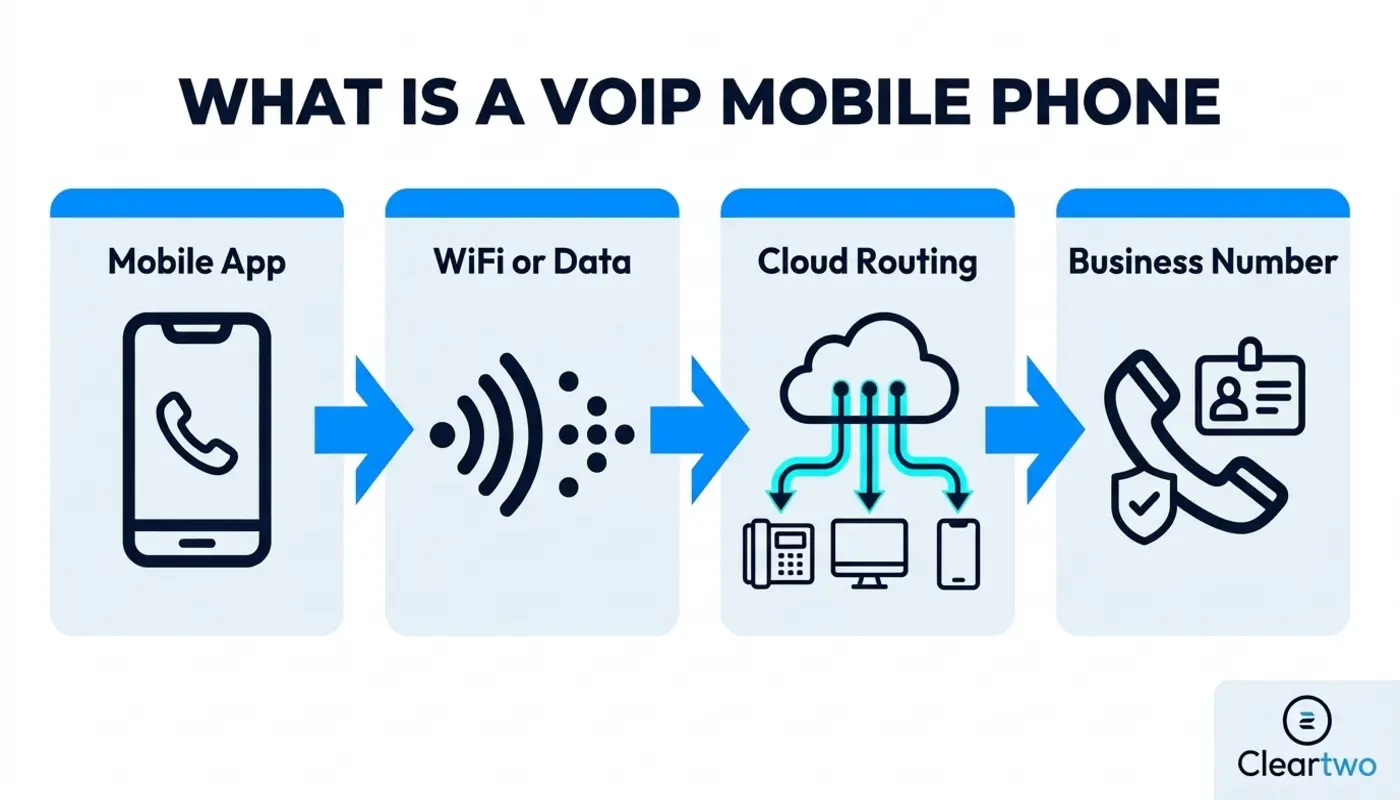
So, a call can travel over WiFi or mobile data. This lets you use a business caller ID, answer office calls on your mobile, join call queues, access voicemail, record calls where suitable, and connect calls to a cloud phone system.
No cap, this is where mobile working gets a serious upgrade. A standard smartphone is built for personal calling. A connected calling setup makes it part of your wider business telephony system. If your team needs to look professional without carrying two phones, this is a strong move.
How It Differs From A Standard Smartphone
The handset may be exactly the same. The difference is how calls are made, managed, routed, and tracked behind the scenes.
A standard mobile call usually uses the mobile voice network. It also shows the SIM number as the caller ID. Internet calling on your phone can use an app, a mobile softphone, Microsoft Teams Phone, or a cloud phone system extension. That means a staff member can call from a mobile while showing the company number instead of a personal 07 number.
Ever had a customer call your personal mobile after hours? That is the kind of awkward moment this setup helps avoid. It is huge for remote staff, sales teams, field engineers, estate agents, recruiters, consultants, and anyone who does not want customers saving a personal number. It also gives managers better control over call handling, call recording, CRM integration, and reporting.
How VoIP Works On A Mobile Phone
When you make an internet based call on a mobile, your voice is picked up by the microphone. It is changed into digital data, compressed, split into small packets, and sent over WiFi or mobile data. The receiving service then puts those packets back together so the other person hears your voice.
Business calling platforms often use SIP and RTP behind the scenes. SIP helps set up, manage, and end the call. RTP usually carries the live sound. Simple as that.
If you call another user on the same app, the call may stay online from start to finish. If you call a normal UK landline or mobile, the platform connects your call to the public phone network. That is why number setup, caller ID, emergency calling, and call charges matter.
Ways To Turn A Mobile Into A VoIP Device
There are a few ways to use VoIP on a mobile phone. The best route depends on your business setup, your team size, and how you want calls to flow. Honestly, choosing the right option early can save a lot of hassle later.
- Mobile softphone app
- Hosted phone system extension
- Microsoft Teams Phone
- Teams mobile calling
- SIP trunking setup
- Cloud call routing
- Business caller ID
The simplest route is a business calling app for mobile use. Staff install the app, sign in, and start making calls with the company number. A hosted phone system extension goes further. It makes the mobile part of the company phone system, with call transfer, queues, voicemail, hunt groups, and presence.
Microsoft Teams Phone is another big option. Teams chat and meeting calls are not the same as calling normal phone numbers. To call regular UK numbers from Teams, you need Teams Phone and the right connection to the public phone network. If Teams is already your daily workspace, Microsoft Teams phone system support can make mobile calling feel much more joined up.
VoIP Mobile Apps Vs Traditional Mobile Networks
VoIP mobile apps are useful when you need business features, central control, and a professional calling identity. Traditional mobile networks are still useful for simple personal calls, native emergency calling, or areas where mobile data is weak.

With a phone system on your mobile, you can answer office calls on the move. You can also transfer a customer to another colleague, record calls where legally suitable, and log activity in a cloud CRM. With a traditional mobile call, you usually get simpler calling linked to the SIM number.
The switch is not about replacing every mobile contract overnight. It is about giving staff a better business communication layer. That may include hosted VoIP, cloud call routing, UCaaS, SIP trunking, Microsoft Teams Phone, or a blended setup. UCaaS means unified communications as a service. It brings calls, messages, meetings, and related tools into one service. Check this out, the best setups often use both mobile data and business calling tools together. That gives users flexibility without losing resilience.
How Remote And Field Based Workers Use VoIP Mobile Phones
Remote and field based workers use VoIP mobile phones to stay professional from anywhere. They can make calls from the company number, receive transferred calls, join call queues, and access voicemail without being tied to a desk phone.
This is massive for hybrid teams. A service engineer can call a customer from the road using the business caller ID. A sales rep can call from home and have the call logged in the CRM. A support agent can answer a queue call from a mobile while still following the company call flow.
It also supports smarter workflows. Calls can trigger notes, tasks, follow ups, and customer records in custom CRM systems. Your team spends less time chasing admin and more time helping customers. Pair that with clear reporting and good IT support, and your mobile calling setup becomes part of a cleaner way to work.
Call Quality On A VoIP Mobile Phone
VoIP call quality on a smartphone depends on connection strength, latency, jitter, packet loss, headset quality, background apps, and platform setup. In plain English, your call sounds good when your internet connection is stable and your phone is not struggling.
Latency means delay. Jitter means sound packets arrive at uneven times. Packet loss means small parts of the call data go missing. WiFi congestion can make calls choppy. Weak 4G or 5G can cause delays. A poor Bluetooth headset can make you sound unclear. VPN routing can also slow calls down if voice traffic takes a long route.
For best performance, test calls in real working locations. Check offices, warehouses, home setups, vehicles, and customer sites. Use decent headsets. Keep apps updated. Allow notifications. Set mobile data fallback where possible. If your calls sound patchy or delayed, this guide to improving VoIP call quality is a good next step.
Cost Difference For UK Business Users
Internet based mobile calls can be cheaper than standard mobile network calls. The real cost depends on usage, licences, data, international calling, call recording, CRM integration, and support. So yes, savings can be real. The total cost still needs to be checked properly.
UK businesses may reduce costs when they replace old PBX hardware, cut line rental, centralise call management, or avoid buying desk phones for every user. PBX means private branch exchange. It is the phone system that manages business calls. Some businesses can save up to 60% compared with older phone setups, especially where old equipment and high call volumes are involved.
But let's keep it real. A cheap app with poor support can cost more in missed calls and unhappy staff. Look at the full picture. Include number porting, mobile data, Teams licences, call recording, analytics, IT security for SMEs, and managed support.
Security And Privacy For Mobile VoIP
Mobile VoIP needs proper security because business calls may include customer data, payment details, legal updates, health information, or private business talks. The basics matter. Getting them right helps protect your team, your customers, and your reputation.
Use strong passwords, multi factor authentication, device passcodes, app updates, role based access, secure voicemail PINs, and remote wipe for lost phones. Good providers also support encryption in transit, fraud monitoring, spending limits, and blocks for risky international destinations.
Call recording is another area where UK businesses need care. Recording can help with training, disputes, and regulated work. You still need a clear reason, proper notice, access controls, and retention rules. If your sector has extra rules, get compliance advice before rollout.
How Cleartwo Delivers CallSwitch One For UK Teams
For businesses that want a strong mobile calling experience without messy setup, CallSwitch One is a smart partner platform supplied through Cleartwo. Cleartwo is a CallSwitch One reseller. That means customers get a powerful communications platform with a more personal managed service around it.
That reseller model matters. You get competitive pricing, better support, improved service, and help from people who understand the wider UK business technology picture. Instead of buying a platform and working it out alone, Cleartwo can help configure users, numbers, call flows, Teams voice integration, CRM integration, call recording, and training.
That is the better vibe for SMEs. You get enterprise style phone features without the enterprise headache.
How Cleartwo Supports UK Mobile VoIP Setups
Cleartwo helps UK businesses set up internet calling on mobile devices. The team can audit your current phone estate, design call flows, configure users, port numbers, test quality, and support staff after launch. It is not just about installing an app and hoping for the best.
The process usually starts with understanding your current setup. That includes PSTN lines, ISDN, desk phones, mobiles, Teams, CRM, broadband, and any devices that still rely on older phone lines. PSTN means the traditional public phone network. The UK PSTN switch off is expected to complete by January 2027. Now is the time to review everything, not panic later.
Cleartwo can also connect mobile calling with CRM workflows, reporting, call queues, auto attendants, call recording, and UCaaS features. If your team is planning a wider move from older systems, this step by step guide to switching business phone systems can help you understand the move before you make it.
How To Choose The Right VoIP Mobile Solution In 2026
Choose a VoIP mobile solution based on how your team works, not only the cheapest monthly price. A solo consultant may only need a mobile softphone and business number. A growing SME may need hosted phone features, call queues, Teams Phone, SIP trunking, recording, and CRM integration.
Ask whether callers will see your business number. Check if calls can ring mobiles, desktops, and desk phones at the same time. Confirm what happens if data drops. Test emergency call procedures. Make sure support is UK based and responsive.
Also check whether the platform works with your business tools. If your sales team lives in a CRM, call logging and click to call can be game changing. If your company uses Microsoft 365 daily, Teams voice integration may be the cleanest route. If you are replacing old telephony, hosted VoIP with a cloud phone system can give you strong all round control.
Frequently Asked Questions
Can I Use VoIP On My Existing Mobile Phone?
Yes, most UK users can use VoIP on an existing iPhone or Android phone. You can install a mobile softphone app or use a supported business calling platform. The phone needs stable WiFi or mobile data, enough battery, the right app permissions, and a VoIP service configured with your number and call features.
Does The PSTN Switch Off Affect Mobile VoIP?
The PSTN switch off mainly affects old analogue landlines, ISDN, legacy PBX systems, alarms, fax lines, and similar connected services. It does not switch off 4G or 5G mobile networks. It is still a strong reason for UK businesses to review their full phone setup and move to digital options such as VoIP.
Is Mobile VoIP Cheaper Than A Normal Mobile Contract?
Mobile VoIP can be cheaper for business users, especially when teams need shared numbers, call routing, international calling, CRM integration, or fewer desk phones. The real cost depends on licences, call bundles, mobile data, setup, recording, integrations, and support. Compare total cost, not only call minutes.
Can I Use Microsoft Teams For Mobile VoIP Calls?
Yes, Microsoft Teams can support business calling on mobile devices. Calls to normal phone numbers need Teams Phone and a suitable connectivity setup. Teams to Teams calls are different from calls to landlines and mobiles. A managed provider can help configure users, numbers, routing, policies, and support correctly.
Is VoIP Call Recording Legal In The UK?
VoIP call recording can be legal in the UK when there is a clear purpose, suitable notice, secure storage, access control, and proper retention rules. Businesses should tell callers where recording takes place and explain why. Regulated firms should check sector rules before enabling recording across mobile users.
If you want your team to make and receive business calls from mobile devices without setup stress, Cleartwo can help you plan it, configure it, and support it properly. Let's get your mobile calling sorted.