Microsoft Teams Phone Systems: Complete UK Setup Guide
Setting up a Microsoft Teams phone system UK can feel like a lot at first. Let’s be honest. With the PSTN switch off landing in January 2027, loads of UK businesses are rushing to upgrade their business telephony. And honestly, it’s time to level up.
Old ISDN lines? That’s giving early 2000s energy. The cloud is the vibe now. Hosted VoIP, cloud PBX, SIP trunking, UCaaS and Microsoft Teams phone are where the momentum is.
At Cleartwo, we help businesses move from outdated lines to a fully managed hosted VoIP and Microsoft Teams phone setup without stress. We handle the migration, number porting, network checks and training. You get enterprise features at SME prices, a 99.99 percent uptime SLA and real UK based support. Simple as that.
Why Microsoft Teams Phone System UK Matters Right Now
The PSTN switch off is real. It will shut down old-school lines by January 2027. If you’re still using ISDN or analogue, you need a cloud based setup like hosted VoIP phone systems. No cap.
Microsoft Teams phone system UK is blowing up because most UK businesses already use Microsoft 365. Instead of juggling apps, you turn Teams into your cloud PBX. Calls, chat, meetings, voicemail and recording all in one spot. Clean and simple.
If you’re still comparing options, check out our guide to modern business phone systems. It makes the switch feel way easier.
What A Teams Phone Setup Actually Does
Here’s the quick breakdown. Microsoft Teams phone lets you make and take external calls straight from Teams. You can ring mobiles and landlines right from the app.
It connects to the public phone network using:
- Microsoft Calling Plans
- Operator Connect
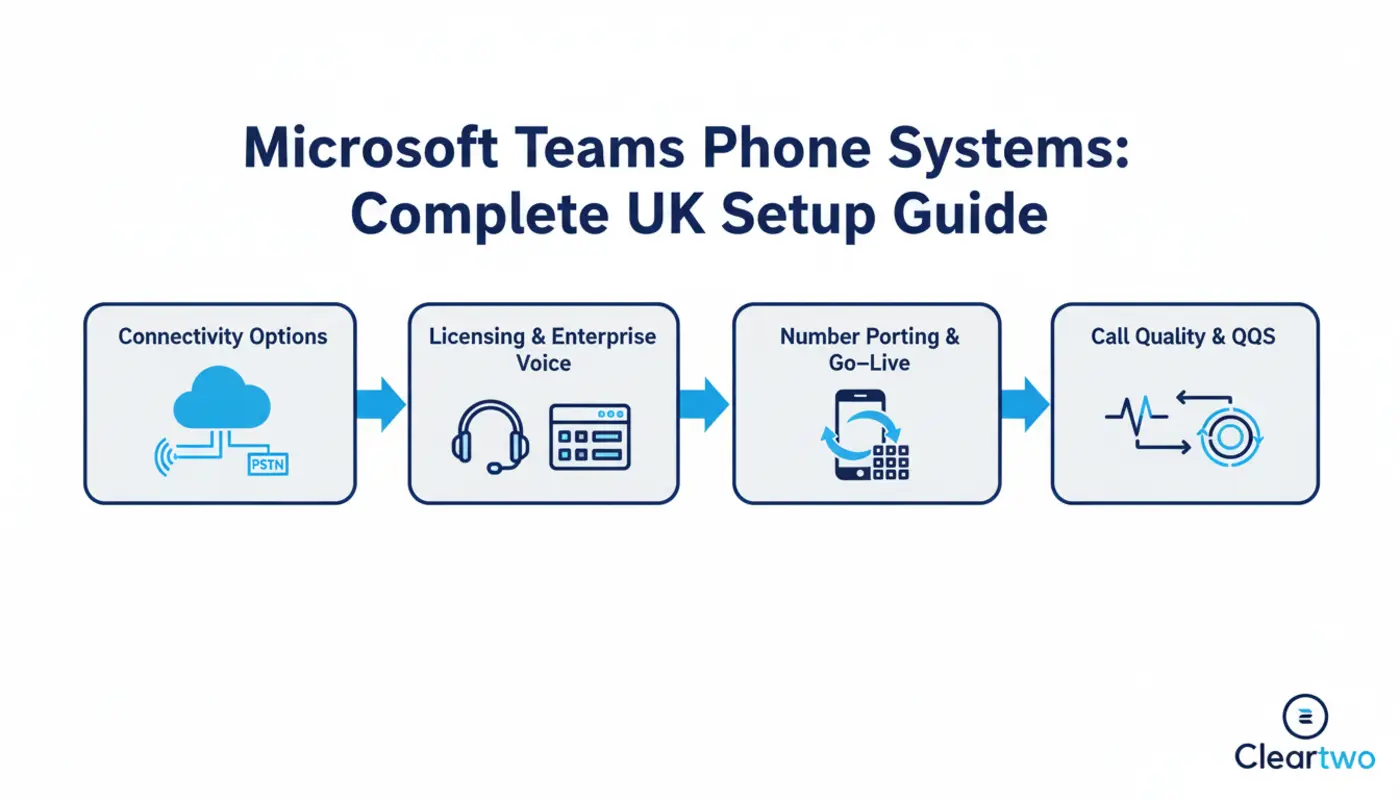
- SIP trunking through Direct Routing
Direct Routing uses SIP trunking and a Session Border Controller. Sounds techy but it gives you more control and lower call costs.
Step By Step Microsoft Teams Phone System UK Setup
Here we go. This is the smooth path to getting everything live.
Step 1 Assess Your Current Setup
Check what you use now. ISDN, analogue or an old PBX. This is where PSTN switch off planning starts.
We run a full audit first. Network strength, users, call volumes, remote workers. Want more detail? Our guide on planning a smooth VoIP transition breaks it down clearly.
Step 2 Choose Your Connectivity Option
Now you pick your route.
Calling Plans are simple. Good for small teams.
Operator Connect offers more carrier choice.
Direct Routing gives you top control and strong cost savings.
We often use SIP trunking services for clients who want long term savings. It scales easily, no cap.
Step 3 Licensing And Enterprise Voice
Each user needs a Teams Phone licence. Then you turn on Enterprise Voice in the Teams Admin Centre.
This unlocks features like:
- Auto attendants
- Call queues
- Voicemail transcription
- Call recording
- Call forwarding rules
- CRM integration options
This is full UCaaS power.
 Step 4 Number Porting And Go Live
 Step 4 Number Porting And Go Live
You can use new numbers or port your old ones. Porting in the UK usually takes two weeks.
Planning matters. We handle timing so your team barely feels the switch.
Cost Breakdown And What No One Tells You
Let’s be honest. Pricing can get confusing.
Calling Plans look cheap but can get pricey with growth or international calls.
Direct Routing with SIP trunking often cuts call costs, especially for teams with 50 or more users.
See our full breakdown in cloud PBX cost comparison in the UK. Real examples included.
The key is total cost of ownership. Not just licence fees. Add call volumes, support, compliance and growth plans.
CRM Integration And Business Automation
Now this part hits different.
When Teams phone connects to your CRM, calls log automatically. Customer info pops up. Sales teams save time. That’s real automation.
We also link Teams with custom CRM systems, digital marketing and e-commerce tools. It helps sales and marketing work together with ease.
For companies using AI solutions and AI marketing tools, Teams call data gives strong insights. You get call trends, missed opportunities and conversion stats.
Security stays tight too. Built in encryption, secure call recording and GDPR friendly retention. Simple as that.
Network Readiness And Call Quality
Cloud calling needs stable internet. That’s the whole story.
Each call uses around 30 to 50 Kbps. If you run 20 calls at once, you need decent bandwidth and good router settings.
We run network checks and set Quality of Service rules so voice stays clear. No one wants robotic audio mid call. That kills the vibe.
If you’re into digital transformation or web development, this fits right into your IT plans.
Why CallSwitch One Levels This Up
This is where things get exciting.
We’re official resellers of CallSwitch One. It gives our clients a serious boost.
CallSwitch One upgrades hosted VoIP and Microsoft Teams phone setups with strong management tools, sharp pricing and reliable support.
Clients get:
- Better UK support
- Competitive prices
- Flexible contracts
- Improved reliability
- Faster fixes
- Easy scaling
This is fully managed. No late night searches for PowerShell commands. Cleartwo handles it.
Why Businesses Choose Cleartwo For Teams Phone
You could follow Microsoft docs and go DIY.
But this is where chaos can happen. Failed ports. Missing emergency settings. Messy CRM links.
Cleartwo manages everything from PSTN planning to SIP trunk setup, Teams phone integration, call recording compliance and user training.
We mix cloud PBX with digital marketing solutions, automation and secure IT support. It’s not just telephony. It’s your full comms setup running at peak flow.
If you’re still using an old PBX, your rivals are already ahead. Time to catch up. High key.
Frequently Asked Questions
When Do I Need To Move Before The PSTN Switch Off
The PSTN switch off hits in January 2027. If you’re on ISDN or analogue, move 6 to 12 months early to avoid stress.
Is Microsoft Teams Phone Cheaper Than Traditional PBX
For most SMEs, yes. Hosted VoIP and cloud PBX cut call and line costs. Direct Routing users often save even more.
Can I Keep My Existing Business Numbers
Yes. Number porting keeps your old numbers. It takes 10 to 15 working days if details are correct.
Does Teams Phone Support Call Recording For Compliance
Yes. Teams phone supports call recording and works with GDPR and FCA needs.
How Long Does A Full Teams Phone Setup Take
Most SME setups take 4 to 8 weeks. Bigger setups may take longer.
If you’re looking at Microsoft Teams phone system UK options and thinking it feels big, you’re right. But it’s a massive upgrade too.
The switch off is coming. Cloud calling is the future. And once it’s live, you’ll wish you switched sooner. Let’s go.