VoIP Phone System Choice
To choose the right phone setup, start by checking how your business handles calls today. Then match the system to your users, call flows, support needs, integrations and growth plans. If you are asking How to Choose the Right VoIP Phone System, that is the short answer. Do the audit first. Do not buy the platform with the flashiest demo. That is how firms pay for smart buttons nobody uses.
If you want a practical place to begin, Cleartwo helps organisations review their current setup. Cleartwo can compare hosted VoIP, cloud PBX, SIP trunking and Microsoft Teams calling options. The aim is simple. Choose what fits the business, not what sounds clever in a sales pitch.
Cleartwo is a fully managed UK VoIP specialist. It helps with the awkward parts many providers skip. That includes managed setup, UK based support, Teams voice integration, useful business features and a 99.99% uptime SLA. Useful stuff, not brochure confetti.
PSTN Switch Off
The UK PSTN switch off is set for 31 January 2027. Businesses using analogue lines or ISDN need to move before the old network goes. This is not just about replacing desk phones. Payment terminals, lift alarms, security systems, fax lines, door entry systems and emergency lines may also depend on old connections. Miss those, and you have created a problem you could have avoided.
Audit Your Current Communication Setup First
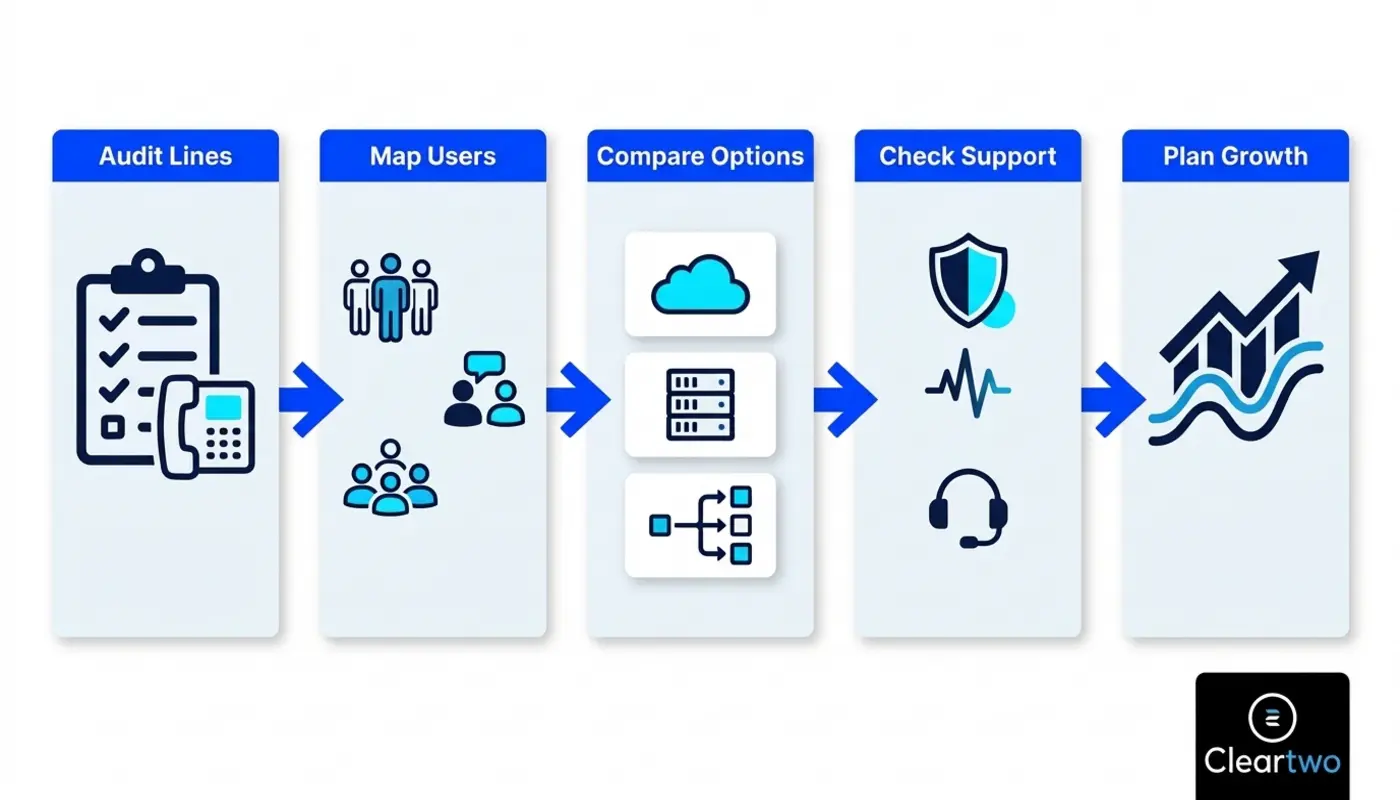
Before you compare providers, list every number, device and call process your business uses. Include main numbers, direct dials, department numbers, non geographic numbers, voicemail rules, call queues, hunt groups, call recording and fax lines. Also check anything still plugged into an old socket like it is 1998.
Look at how calls move through the business. Who answers first? Where do missed calls go? Does reception transfer calls by hand all day? Are remote staff using personal mobiles because the current system is useless outside the office? Let's be real. If your call process lives in someone's head, it is not a process. It is a risk wearing a headset.
Review your network as well. VoIP needs a stable internet connection, good local network quality, strong Wi Fi, power and backup plans. Staff should know what happens if the internet drops. Poor latency, jitter or packet loss can make calls sound terrible. If you are unsure where to start, this business phone system audit guide is a sensible next step.
Cloud Hosted VoIP And On Premise VoIP
Hosted VoIP puts your phone system in the cloud. The provider manages the main platform. This suits many small and medium sized firms because it lowers upfront costs, supports remote working and makes it easier to add users, sites and features. You still need good internet. You do not need to nurse an old PBX in a cupboard like it is a family heirloom.
On premise VoIP gives you more control. The phone system sits on your own equipment. This can suit organisations with in house IT teams, strict control needs or complex call routing. The trade off is clear. You carry more responsibility for updates, security, resilience and faults.
SIP trunking sits between these choices. It connects an existing IP PBX to the phone network over the internet. It can protect past investment, but only if the current system is still worth keeping. Stop pretending old hardware becomes modern because you attach a new service to it. Sometimes the right move is to retire it.
Must Have VoIP Phone System Features
The right setup should handle everyday calling before it starts showing off. Look for number porting, caller ID, voicemail, auto attendant, call queues, call transfer, call forwarding, business hours routing, mobile apps, softphones and clear admin controls. If these basics are messy, the rest is decoration.
After that, check features that save time. CRM integration, click to dial, automatic call logging, screen pops, call reports and call recording can help teams work faster. Are you paying for features nobody has opened since the demo? Cut the nonsense. Focus on tools your team will actually use.
Security and compliance matter too. Call recording should include access controls, storage rules, encryption and audit trails. GDPR does not care that the feature looked easy in the demo. If recordings are stored badly or viewed by the wrong people, that is still your problem.
- Number porting support
- Call recording controls
- CRM call logging
- Teams voice integration
- Mobile app access
- UK based support
- Clear admin tools

Match The System To Your Business Size
A five person firm does not need the same setup as a multi site business with support queues, call recording, compliance needs and remote teams. Obvious, yes. Yet many businesses still buy phone systems as if a bigger feature list means a better choice. Come on.
Small businesses should focus on simple management, clear pricing, mobile access and quick setup. Growing businesses need flexible user licences, call queues, role based access, reports and CRM integration. Multi site organisations need central control, local numbers, site level backup and a consistent user experience across offices.
If your team uses Microsoft 365 every day, Teams calling is worth checking. Using Teams for meetings is not the same as using it for external phone calls. To call customers, suppliers and mobiles from Teams, you need PSTN access. That usually comes through Calling Plans, Operator Connect or Direct Routing. Direct Routing is useful when you need more control over carriers, numbers and call routing.
Calculate The Total Cost Of Ownership
Do not compare systems by monthly licence price alone. That is how the cheap option becomes expensive later. Total cost includes licences, call bundles, usage charges, handsets, headsets, number porting, setup, training, network upgrades, support, compliance storage and integration work.
Look at three year and five year costs. Include downtime and missed calls too. If a cheaper system drops calls, delays support or wastes staff time, it is not cheap. It is just hiding the bill somewhere else.
Cloud calling can cut costs when it replaces old line rental, ageing PBX maintenance and separate tools. Savings depend on usage, contract terms, hardware needs and support. Straight up, any provider promising huge savings without checking your setup is guessing.
Ask Hard Questions About Reliability And Support
VoIP reliability depends on more than the provider platform. It depends on broadband, routers, switches, Wi Fi, power, handsets, apps and call routing. Ask proper questions before signing. Where is the platform hosted? Is there resilience in more than one location? What happens during a power cut? Can calls fail over to mobiles?
Support is where many buying decisions fall apart. Some providers are brilliant until something breaks. Then you are bounced between broadband, handset, network and phone teams. Lovely. Exactly what you need when customers cannot get through.
Ask who owns the fault from start to finish. Check response times, escalation routes, service levels, out of hours support and whether changes are included. If your business has limited internal IT support, managed help is not a nice extra. It is the difference between a calm move and organised chaos.
Why Cleartwo Recommends CallSwitch One
Cleartwo recommends CallSwitch One as a partner platform when it fits the customer's needs. It gives growing teams a strong and flexible calling platform with features people actually use. As CallSwitch One resellers, Cleartwo implements, configures and supports the platform as part of a managed service. That keeps it inside the wider Cleartwo solution.
That reseller model matters. You get a capable cloud phone system, but you also get Cleartwo handling discovery, setup, number porting, call flows, CRM integration, Teams voice planning and ongoing support. In plain English, you are not left alone after someone takes your card details.
This is useful when calls connect with wider business work. Many firms need phone systems that work with CRM, IT support, security and automation. Calls are not isolated anymore. They sit inside the customer journey, whether your team is selling, supporting or chasing leads that should have been followed up yesterday.
Plan The VoIP Implementation Properly
A good rollout starts with discovery, not panic on installation day. Confirm numbers, users, call flows, devices, broadband, network readiness and any analogue line dependencies. Then test a small group before moving everyone over. Revolutionary, I know. Testing before breaking things.
During setup, test inbound calls, outbound calls, transferred calls, emergency calling, voicemail, caller ID, recording, CRM logging and mobile apps. Train reception staff properly because they feel the pain first when routing is wrong. Managers should also know how to read call reports and spot missed call patterns.
After launch, monitor call quality and user feedback. Tune queues, adjust routing and confirm old lines are retired safely. For a wider look at practical VoIP services, explore Cleartwo's VoIP phone system solutions.
Future Proof Your VoIP Choice
The right system should scale without forcing a rebuild every time your business grows. Check how easily you can add users, sites, numbers, call queues, recording storage, CRM features and Teams calling. Can your current system handle another office, remote team or sales queue? If scaling needs a new contract every five minutes, that is not flexibility. That is admin theatre.
Check the technology roadmap too. UCaaS means unified communications as a service. In plain English, it brings voice, messages, meetings and teamwork tools into one managed setup. Add reports, automation, APIs and secure integrations, and your phone system becomes part of how the business runs. Not just something that rings.
Finally, confirm exit terms. Who owns your numbers? Can recordings and data be exported? What happens if you leave? Any provider that gets vague here deserves a raised eyebrow. Your phone numbers are business assets, not hostage material.
Frequently Asked Questions
Do Businesses Need To Move To VoIP Before The PSTN Switch Off?
Yes. Businesses using PSTN or ISDN lines should plan their move before the 31 January 2027 switch off. The key is to audit more than phones. Alarms, payment terminals, lift lines, fax machines and door entry systems may also depend on old lines and need separate upgrades.
How Much Can A VoIP Phone System Save A Business?
VoIP can reduce costs by cutting old line rental, PBX maintenance and separate communication tools. Savings depend on licences, call use, connectivity, hardware and support. The smart move is to compare three year or five year total cost, not just the monthly price per user.
Can VoIP Work With Microsoft Teams?
Yes. VoIP can work with Microsoft Teams through Teams Phone options such as Calling Plans, Operator Connect or Direct Routing. The best route depends on your numbers, routing needs, compliance rules, current telecoms setup and whether Teams should become your main calling tool.
Is Call Recording Legal For Businesses?
Call recording can be legal in the UK, but it must be handled properly. Businesses need a lawful reason, clear policies, secure storage, access controls, retention rules and staff training. Regulated firms may also need specific recording rules, so compliance should be built in from the start.
How Long Does It Take To Set Up A Business VoIP System?
A simple setup can often be completed within days once numbers, users and devices are confirmed. More complex projects can take several weeks. This includes work with multiple sites, number porting, CRM integration, Teams voice, call recording and old line replacement. Testing and staff training should not be skipped. Obviously.