How To Configure VoIP
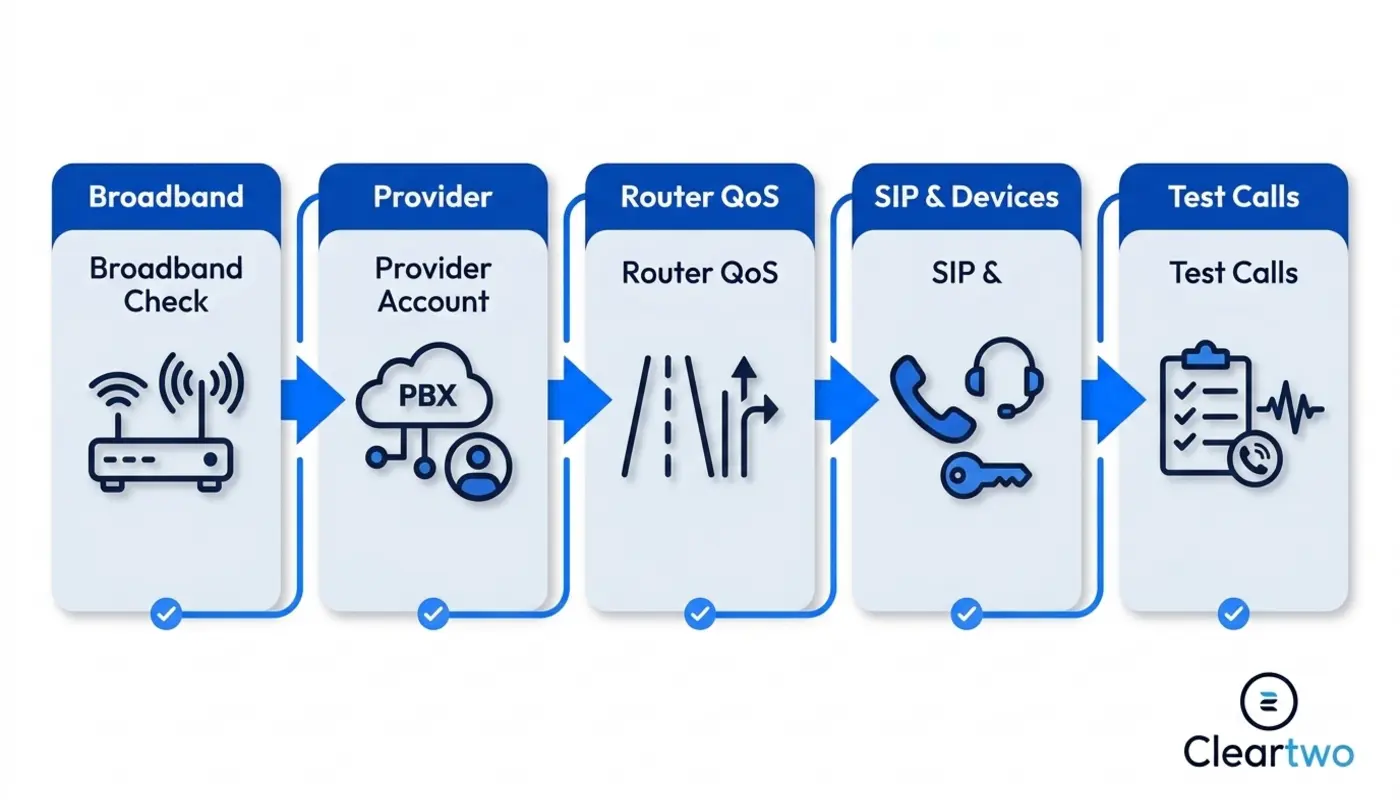
To configure VoIP, you need stable broadband, a suitable router, a VoIP provider account, SIP settings, devices, call routing, testing, and support. It is not just plugging in a phone and hoping for the best. That is how offices end up with silent phones and a very loud manager.
For UK businesses, this matters now. The PSTN switch off is planned for January 2027. If your phones still use analogue or ISDN lines, you need a clear move to digital calls before that date. Waiting until the last minute is a bold plan. A bad one, obviously.
Cleartwo helps businesses avoid the usual VoIP mess with managed UK VoIP setup, UK based support, Teams voice integration, enterprise features at SME pricing, and a 99.99% uptime SLA. If you want it handled properly, start with Cleartwo instead of trying to decode router settings at 11pm with three tabs open and a headache.
VoIP Checks Before You Start
Before you configure VoIP, list your users, current phone numbers, broadband setup, call flows, compliance needs, and existing PBX equipment. Skipping this step is how calls end up ringing in the wrong office. Useful if chaos is the goal. It usually is not.
Start by mapping your numbers. Include main lines, direct dials, fax numbers if you still have them, and any numbers used for alarms, lifts, card machines, or telecare. These details feel boring until they stop working.
Then choose your setup. Hosted VoIP gives you a cloud PBX. This means the phone system lives online instead of in a cupboard. SIP trunking connects your existing PBX to internet based calling. Microsoft Teams Phone works well if your team already uses Teams every day.
Check compliance too. Emergency calls must show the right location. Call recording needs clear GDPR rules. Regulated sectors may need stricter storage and access controls. Recording every call forever because nobody made a decision is not a policy. It is a problem.
Choosing A VoIP Provider Account
Choose a VoIP provider based on reliability, support, number porting, call routing, call recording, CRM integration, and Teams Phone options. Do not choose only on the lowest monthly price, unless you enjoy support tickets disappearing into the void.
Your provider account should be built around users, teams, and permissions. Create extensions for staff. Add shared numbers for teams. Set ring groups for sales, support, accounts, and reception. If you need a practical buying checklist, read how to choose the right VoIP phone system provider.
Number porting needs care. This means moving your existing UK numbers from your old provider to your new VoIP system. Plan a clear cut over date. Test numbers first. Keep a fallback route. Do not cancel old lines before the port is complete. Obviously.
A good provider also helps with emergency location setup, voicemail to email, call queues, reports, and secure admin access. A bad provider sends a login and wishes you luck. Revolutionary customer service, apparently.
Preparing Broadband For VoIP
VoIP needs stable broadband with low latency, low jitter, and enough upload capacity for all active calls. In plain English, your internet must be steady. A fast speed test means very little if the line drops every time someone uploads a large file.
A single VoIP call does not use much bandwidth. Ten or twenty calls at once soon add up. Consistency matters more than headline speed. Packet loss causes broken audio. Jitter causes robotic voices. Latency causes awkward pauses where everyone talks over each other.
FTTP is usually better than FTTC because fibre to the premises gives stronger stability. Leased lines are better for larger sites or heavy call volumes. If your business relies on calls, treat broadband like business infrastructure. Not like a bargain bin extra.
Use wired Ethernet for desk phones where possible. Wi Fi softphones can work, but weak signal, crowded access points, and badly placed routers can damage call quality. Yes, the router hidden behind the filing cabinet is probably not helping.
Configuring Router Settings For VoIP
Router configuration for VoIP means giving voice traffic priority, checking firewall access, and fixing settings that block calls. Quality of Service, often called QoS, tells your network that voice calls matter more than someone downloading a huge file. Sensible, really.
Start by checking SIP ALG. SIP ALG is a router feature that tries to help VoIP traffic. It can cause registration issues or one way audio. It often helps in the same way a toddler helps decorate a cake. Check your provider guidance and test it properly.
Set firewall rules for SIP signalling and RTP media. SIP starts and controls the call. RTP carries the audio. Common SIP ports include 5060 and 5061. RTP often uses a wider port range such as 10000 to 20000. Your provider will confirm the exact settings.
Set QoS so voice traffic gets high priority. Many networks use DSCP EF 46 for voice media. If your router supports bandwidth shaping, cap usable bandwidth to around 85 to 90% of the real line speed. Yes, that sounds backwards. No, it is not.
- Use stable broadband first
- Check SIP ALG
- Enable QoS properly
- Prioritise voice traffic
- Test firewall rules
- Use wired phones where possible
- Plan a backup connection
Setting Up SIP Trunks Or Hosted VoIP
Set up SIP trunks if you are keeping an existing PBX. Set up hosted VoIP extensions if you are moving fully to a cloud phone system. The right choice depends on your current kit, budget, deadline, and how much old hardware you are willing to keep alive.

For SIP trunk setup, your provider gives you credentials, server details, authentication settings, codecs, and number routing rules. A codec compresses voice audio so calls travel well over the internet. Common options include G.711 for high quality and G.729 for lower bandwidth sites.
For hosted PBX setup, create each user, assign an extension, choose devices, and set outbound caller ID. Hosted VoIP is cleaner for most SMEs because it removes the old PBX and lets you manage calls through a cloud portal.
Hybrid migration can also work. You may keep the old PBX for a short time while moving sites or teams in stages. This lowers risk before the UK PSTN switch off in January 2027. Just do not let temporary become forever. That is how technical debt gets its own chair in the boardroom.
Configuring VoIP Handsets And Softphones
Once the network is ready, set up the phones and users properly. This is where sloppy admin creates real problems, usually five minutes after go live.
VoIP devices need correct provisioning, network access, extension assignment, and user testing. Provisioning means sending the right settings to the phone so it connects to the VoIP platform. It saves someone typing passwords into twenty handsets like it is 2004.
Desk phones often use Power over Ethernet, known as PoE. This lets one network cable provide both data and power. For offices with many phones, use business switches that support PoE and voice VLANs. A VLAN separates voice traffic from normal computer traffic. It gives calls their own lane.
Softphones run on laptops and mobiles. They are useful for hybrid staff, sales teams, and remote workers. Set clear rules for headsets, mobile data use, security, and lost phones. If your setup includes IT security for SMEs, device control is not optional.
Train users before launch. Show them how to transfer calls, park calls, use voicemail, record calls where allowed, and switch between devices. People do not magically understand new systems because someone sent a launch email with a smiley face.
Setting Up Call Routing And Auto Attendant
Call routing decides where calls go, who answers first, and what happens when nobody picks up. Get this wrong and your customer experience becomes a maze. A maze with hold music. Nobody asked for that.
Set business hours first. Then create routing for open hours, lunch cover, bank holidays, out of hours, and emergency closures. If sales calls go to the wrong team, the system is not clever. It is badly configured.
An auto attendant is the phone menu that says press one for sales and press two for support. Keep it short. Nobody wants seven options and a lecture.
Hunt groups ring several people in order or all at once. Call queues hold callers until an agent is free. Use queues for support teams and higher call volumes. Use hunt groups for smaller teams where calls need to find an available person.
Add voicemail to email and overflow routing. Overflow sends calls somewhere else if the main team is busy. This can be another department, a mobile app, or an external answering service. Missed calls cost money. Somehow, this still needs saying.
Integrating VoIP With Teams And CRM
VoIP integration connects your phone system with Microsoft Teams, CRM, helpdesk tools, reports, and business workflows. This is where VoIP stops being just phones and starts supporting how your organisation works.
If your team uses Microsoft Teams heavily, Teams Phone with Direct Routing can bring external calls into Teams. It also gives more control over call costs and routing. This works well for businesses already using Microsoft 365 for calls, meetings, and chat.
CRM phone integration can include click to dial, call logging, screen pops, and recording links. With a cloud CRM, custom CRM systems, and digital marketing solutions, this gives sales and service teams cleaner data. You can explore this further through Cleartwo's CRM integration services.
Good integration means useful call data does not sit trapped in a phone portal nobody checks. It can support customer service, sales follow up, reporting, e commerce marketing, web development services, and wider cloud CRM planning.
Why CallSwitch One Helps VoIP Setup
CallSwitch One is a hosted VoIP platform for UK businesses that want UCaaS features, call recording, mobile apps, and flexible communication tools. UCaaS means unified communications as a service. In simple terms, it brings calls, messages, meetings, and tools into one managed platform.
Cleartwo works with CallSwitch One. This gives customers the platform benefits with practical support, competitive pricing, and a more managed service experience. That matters because the platform is only half the job.
Configuration, training, number porting, routing design, and ongoing support decide whether your VoIP system works well. You can learn more about CallSwitch One, then speak to Cleartwo about how it fits your business instead of buying blind and hoping for the best.
Testing Your VoIP Configuration
Test VoIP before go live by checking inbound calls, outbound calls, transfers, voicemail, emergency calling, call recording, routing, queues, mobile apps, and call quality under load. Do not test one call to your mobile and declare victory. That is not testing. That is optimism with a ringtone.
Run a pilot with a small group first. Include office users, remote workers, sales staff, and support staff. Test during busy internet periods. Check jitter, latency, packet loss, and whether QoS is really prioritising voice traffic.
Test number presentation too. Make sure outbound calls show the right caller ID. Check that calls to old numbers land in the right place after porting. Confirm voicemail emails arrive. Make sure recordings are stored with the right permissions and retention settings.
If something fails, fix it before full cut over. Common issues include weak broadband, Wi Fi interference, NAT problems, firewall blocks, old routers, and users plugging phones into random ports because why not add chaos. Customers do not care that your SIP credentials were nearly right. They care that they cannot reach you.
Managing VoIP After Setup
After setup, review your VoIP configuration monthly or quarterly. Keep routing, users, security, call recording, and performance aligned with the business. VoIP is not set it and forget it. That phrase should be banned from every IT meeting.
Review call queues and missed call reports. If one team is overloaded, adjust routing or staffing. Check user lists when staff leave. Abandoned extensions with admin rights are not exactly a security masterclass.
Update call recording policies when legal duties change. Review GDPR access rights, retention periods, and consent messages. If you work in a regulated sector, document who can access recordings and why.
Cleartwo makes this easier with managed implementation, UK based support, ongoing monitoring, and practical advice across VoIP, IT support for businesses, CRM, and wider cloud systems. If you want the broader picture, Cleartwo VoIP phone systems explain how managed business telephony fits together.
Frequently Asked Questions
How Does The January 2027 PSTN Switch Off Affect My Phone System?
If your business still uses analogue or ISDN lines, you must move to digital phone services before the January 2027 PSTN switch off. Existing numbers can usually be ported to VoIP. You still need time to check alarms, lifts, card machines, and any old devices that depend on phone lines.
What Broadband Speed Do I Need For Business VoIP?
Most VoIP calls use modest bandwidth. Call quality depends more on stability than raw speed. You need low latency, low jitter, minimal packet loss, and enough upload capacity for your highest number of active calls. For busy offices, FTTP or a leased line is usually better than basic broadband.
Can I Keep My Existing UK Phone Numbers When Moving To VoIP?
Yes, most UK business numbers can be ported to a VoIP provider. Plan the port carefully. Check ownership details. Keep old services active until the transfer is complete. Cancelling your old line too early can delay or break the number porting process.
How Do I Set Up Call Recording In A GDPR Compliant Way?
Set clear recording rules. Define who can access recordings. Choose retention periods. Tell callers when recording applies. GDPR requires a lawful reason for processing personal data. Do not record everything just because the button exists. Regulated sectors may also need stricter storage and audit controls.
How Long Does It Take To Configure VoIP For A UK Business?
A small hosted VoIP setup can often be configured in days. Number porting and testing can take longer. Larger businesses with SIP trunks, Teams Phone integration, CRM integration, call recording, and multiple sites should plan several weeks. Proper testing beats rushing every time.